Monday, 13 April 2015

Setup Service Cloud Console


Service Cloud Console is very useful for Customer support team, They can able to handle the knowledge, Phone, liveagent and cases in the same window.

To setup the service cloud console:

Goto setup -> Create - > Apps -> Click on New Button


Choose the Console in the list and click Next.


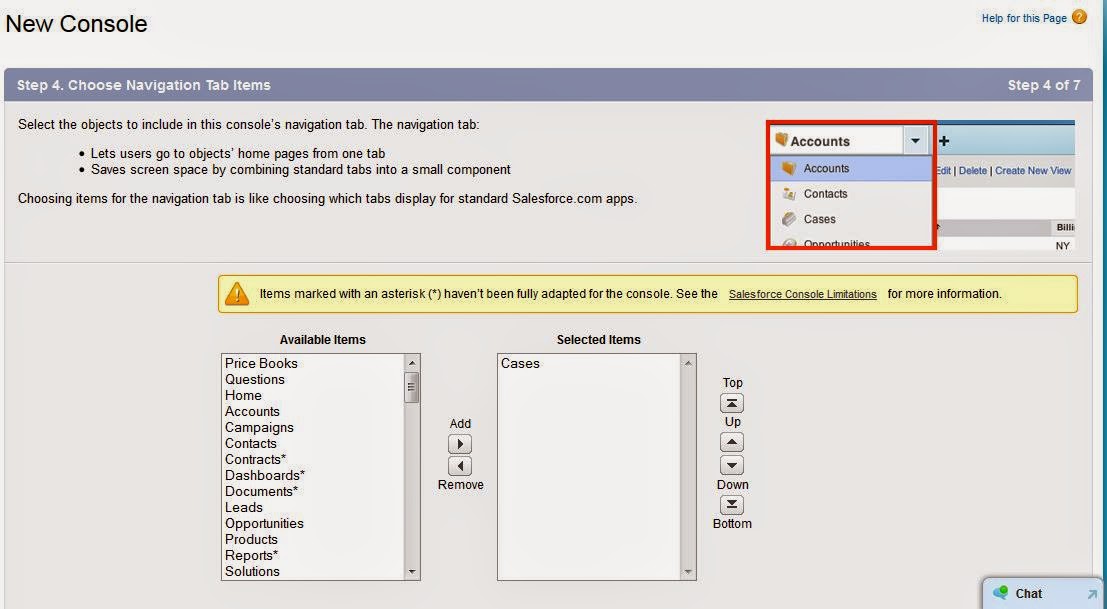
Give the Name of the console and then click next. If you want to insert the company logo you can, then click next.Choose the Navigation Tabs.


If you need any tabs, that CSS team needs to be navigate then we can selects the tabs, to display on the drop down list.


 Sub- Tab 


Sub-tab is used to display at the top of the record detail page. In this case, I have choose the Contact name. when you seeing the record the contact name will be displayed on the top the record like below.


Live Agent and Knowledge:


In this section, we can include the live agent and knowledge into the console. If we want to create new record during the chat,we can choose which records needs to be created.

Then is the profile visibility of the console.


Then click on save.

Now you can see the "Service Cloud Console" on the App list.


And the window will look like below.


Tuesday, 3 February 2015

JSON Deserialize


If Rest API returns the JSON string, below is the JSON String (array of data). if you have square bracket in your JSON then it is returning the array of the data.

String jsonString = '[ {
 "FirstName" : "test",
 "LastName" : "data1",
 "Email" : "test.data1@email.com",
 "Title" : "Mr"
 },
 {
 "FirstName" : "test",
 "LastName" : "data2",
 "Email" : "test.data2@email.com",
 "Title" : "Miss"
 },
 {
 "FirstName" : "test",
 "LastName" : "data3",
 "Email" : "test.data3@email.com",
 "Title" : "Mr"
 },
 {
  "FirstName" : "test",
 "LastName" : "data4",
 "Email" : "test.data4@email.com",
 "Title" : "Miss"
 },
 {
 "FirstName" : "test",
 "LastName" : "data5",
 "Email" : "test.data5@email.com",
 "Title" : "Mr"
 } ] ';

we have to create wrapper class to get or store the values from API.

Wrapper class :
global class wrapperclass_For_API
 {
        public string Firstname{get;set;} // case sensitive we have to give the name as there in JSON.
        public string Lastname{get;set;}
        public string Email{get;set;}
        public string Title{get;set;}       
}

In Apex class the below code can be used to get the JSON without parsing.

 List<wrapperclass_For_API> rs = (List<wrapperclass_For_API>)System.JSON.deserialize(jsonString, List<wrapperclass_For_API>.class);
List<wrapperclass_For_API> wrapperlist = new List<wrapperclass_For_API>();
// If we want to get the data, we can directly get the data from rs variable like below.
for(wrapperclass_For_API s : rs)
{
       wrapperclass_For_API wfa = new wrapperclass_For_API();
       wfa.Firstname = s.Firstname;
       wfa.Lastname = s.Lastname;
       wfa.Email = s.Emaill;
       wfa.Title = s.Title;
       wrapperlist.add(wfa);
}
// after that we can access the values through wrapper list.

If JSON string is not an array, it returns only single user data based on email Id as below

string JSON_string = {
  "FirstName" : "test",
 "LastName" : "data5",
 "Email" : "test.data5@email.com",
 "Title" : "Mr"
}

   Map<String, Object> m = (Map<String, Object>) JSON.deserializeUntyped(JSON_string);
   Object First_Name = (Object) m.get('FristName'); 
   system.debug('**********'+First_Name); // it returns "test"(value of the first name) in the log.
  

Sort Map in Apex Class


Convert the map in to list, to sort the map in salesforce. Below is the example for that.

public class sortmap{

public void mapsort()

{

      map<Integer,string> sortm = new map<Integer,string>();

      List<Integer> sortlist = new List<Integer>();

      sortm.put(10,'E');

      sortm.put(89,'F');

      sortm.put(1,'T');

      sortm.put(2,'Y');

      sortm.put(90,'R');

      system.debug('----------------'+sortm);

      // To sort this map

      sortlist.addall(sortm.keyset());

      sortlist.sort();

      for(Integer i : sortlist)

      {

                  system.debug('Sorting the Map in salesforce'+sortm.get(i));

       }

}
}

Thursday, 4 December 2014

How to limit the scope in batch class

While executing the batch, you can limit the scope of the batch class.

Example:

Below is the sample batch class

Batch Class:

global class BatchClass implements  Database.Batchable<Sobject>
{
                global Database.QueryLocator start(Database.BatchableContext BC){
                }
                global void execute(Database.BatchableContext BC, List<case> scope){
                }
                global void finish(Database.BatchableContext BC){
                }
}

While calling the batch class in another class

BatchClass exter = new BatchClass();
database.executebatch(exter,1);

In the execute method , we can give the parameter to limit the scope.

Tuesday, 16 September 2014

By Pass the Validation Rule while Updating record via trigger.

  For Example I have a validation rule in Opportunity Object, that we should not leave the type Field as blank. Below is the screen shot for that.


Validation rule for above message look like below.


I want to see the error message in the UI and not on trigger. If I want to update the record via trigger, I should not  see this error message.To overcome this, sometimes we want to bypass the validation rule.

To avoid validation rule for particular profile, we can give the validation rule like below.


we want to by pass validation rule when any Profile user attempt to execute the trigger, we can follow the below steps.

1. Create a check box field in Opportunity Object, say "By Pass Validation"

2. we need to change the validation rule like below.

3.When I change the subject of task it should update the Opportunity, Task trigger will look like below. In that trigger I have updated the opportunity field "By Pass Validation".

4. We need to create the workflow, because we have made the By Pass Validation field to true, which will always skip the validation. We want the validation to skip only the trigger.


Once the workflow is activated, It will skip the validation rule for the trigger not from UI.

Monday, 23 June 2014

TEST Class for REST API Call.

Writing TEST class for REST API

If you want to have a reference for how to write REST API, please use the below link.

http://priyamohanraj.blogspot.in/2014/05/calling-rest-api-in-salesforce.html

we should first write the MOCK Class for the http Request.

MOCK REQUEST FOR TEST CLASS

@isTest
global class Mockhttpcallouts implements HttpCalloutMock {
    global HTTPResponse respond(HTTPRequest req)
    {
        system.debug('------------------'+req);
        HttpResponse res = new HttpResponse();
        System.assertEquals('GET', req.getMethod());
        res.setHeader('Content-Type', 'application/json');
        res.setBody('[{"FirstName" : "test","LastName" : "data1","Email" : "test.data1@email.com","Title" : "Mr"},{"FirstName" : "test","LastName" : "data2","Email" : "test.data2@email.com","Title" : "Miss"},{"FirstName" : "test","LastName" : "data3","Email" : "test.data3@email.com","Title" : "Mr"},{"FirstName" : "test","LastName" : "data4","Email" : "test.data4@email.com","Title" : "Miss"},{"FirstName" : "test","LastName" : "data5","Email" : "test.data5@email.com","Title" : "Mr"}]');
        system.debug('------------INSIDE IF-------------');
        res.setStatusCode(200);
         
     
}
}

Now test class for the API Class

The above call will execute whenever Account record is insert, it will trigger this API call and get the contact data and insert the contact data into salesforce.

@isTest(seeAlldata =false)
public class TestExternal_APITrg
{
   @isTest static void APIClass_Test()
   {
  Account ac = new Account();
  ac.Name = 'Test Account';
  ac.CountryName__c = 'India';
  Insert ac;
  Test.startTest();
       Test.setMock(HttpCalloutMock.class, new Mockhttpcallouts());
       try
       {
        APIClass.JSONAPICall(ac);
       }
       catch (System.CalloutException e){
System.debug('ERROR:' + e);
}
}
}

Friday, 23 May 2014

Calling REST API in salesforce

Hi

Today we can see about calling REST API in salesforce.

Step 1 :

If you want to call the REST API in salesforce, first we need to add that URL into Remote Stie Settings.

Goto setup ->Administration setup ->security Controls-> Remote site settings

Click on New
Give the name and Url in the Remote site page and click on save.

Once this URL is saved, we have to write a apex class to call this REST API. Rest API will return the JSON string, below is the JSON String. below is the array of data. if you have square bracket in your JSON then it is returning the array of the data.

String jsonString = '[ {
 "FirstName" : "test",
 "LastName" : "data1",
 "Email" : "test.data1@email.com",
 "Title" : "Mr"
 },
 {
 "FirstName" : "test",
 "LastName" : "data2",
 "Email" : "test.data2@email.com",
 "Title" : "Miss"
 },
 {
 "FirstName" : "test",
 "LastName" : "data3",
 "Email" : "test.data3@email.com",
 "Title" : "Mr"
 },
 {
  "FirstName" : "test",
 "LastName" : "data4",
 "Email" : "test.data4@email.com",
 "Title" : "Miss"
 },
 {
 "FirstName" : "test",
 "LastName" : "data5",
 "Email" : "test.data5@email.com",
 "Title" : "Mr"
 } ] ';

To get this JSON, we need to send http request, to get the data via REST API.

below is the code which is used to fetch the data frm REST API

 global class APIClass
 {
   @future(callout=true)
   public static void JSONAPICall(Account ac)
   {
  Http h = new Http();
  HttpRequest req = new HttpRequest();
  req.setMethod('GET');
  string url='                                                          ';
  req.setEndpoint(url);
  HttpResponse res = h.send(req);
  JSONParser parser = JSON.createParser(res.getBody());
  list<contact> contactsdata = new List<contact>();
        JSONParser parser = JSON.createParser(jsonstr);
        while (parser.nextToken() != null)
        {
            if (parser.getCurrentToken() == JSONToken.START_ARRAY)
            {
         
                while (parser.nextToken() !=  JSONToken.END_ARRAY)
                {
                    if (parser.getCurrentToken() == JSONToken.START_OBJECT)
                    {                    
                        contact ci = new contact();
                        while (parser.nextToken() !=  JSONToken.END_OBJECT)
                        {                        
                                if((parser.getCurrentToken() == JSONToken.FIELD_NAME) &&(parser.getText().tolowercase() == 'title'))
                                {
                                    parser.nextToken();
                                    ci.title = parser.getText();
                                }
                                if((parser.getCurrentToken() == JSONToken.FIELD_NAME) &&(parser.getText().tolowercase() == 'firstname'))
                                {
                                    parser.nextToken();
                                    ci.firstname = parser.getText();
                                }
                                if((parser.getCurrentToken() == JSONToken.FIELD_NAME) &&(parser.getText().tolowercase() == 'lastname'))
                                {
                                    parser.nextToken();
                                    ci.lastname = parser.getText();
                                }
                                if((parser.getCurrentToken() == JSONToken.FIELD_NAME) &&(parser.getText().tolowercase() == 'email'))
                                {
                                    parser.nextToken();
                                    ci.email = parser.getText();
                                }
if(ac != null)
ci.AccountId = ac.Id;
                         
                        }
                        contactsdata.add(ci);
                    }
                }
            }
        }
  if(contactsdata.size() > 0)
  {
   insert contactsdata;
  }
    }

  }

In the URL you have give your API URL, and out put of the API URL is JSON Data. After fetching the data we are inserting the data into contact object.